
Quick Overview
Most organisations don't need hours of UPS battery runtime. They need enough runtime to safely shut down critical systems or bridge the gap until generator power or normal utility power is restored. The right runtime depends on your infrastructure, business continuity objectives and recovery strategy, not simply buying the biggest battery.
Why UPS Runtime Matters More Than Ever
The goal is not to keep systems running forever.
The goal is to provide enough time to maintain business operations, safely shut down systems or bridge the gap until generator power becomes available.
Questions to Consider
Every organisation is different, but these questions usually determine the right UPS runtime strategy:
UPS Runtime Targets for Server Rooms
UPS runtime should be matched to the environment, workload priority and recovery strategy. Some systems only need enough time for a safe shutdown, while others may need to remain online for much longer.
The Practical Sweet Spot
While every environment is different, most organisations don't need hours of battery runtime. The goal is to provide enough time to respond to a power event safely and predictably not simply to keep servers running for as long as possible.
For many organisations, 15–20 minutes is the practical sweet spot.
This typically provides enough time for brief utility interruptions, automated workload migration, controlled shutdown procedures and generator startup without the additional cost, weight and maintenance associated with extended battery runtime.
Scenario 1: Single Physical Server
Many small businesses still operate a simple server room environment with one physical server, a firewall, a switch and access point, internet connectivity and a power load of approximately 500 watts.
Typical runtime target: 15–20 minutes
In this environment, 15–20 minutes of UPS runtime is often sufficient. The objective is not to keep the business operating indefinitely, but to avoid the impact of short utility outages, spikes and abrupt shutdowns.
The primary objective is avoiding:
Long runtime is usually not required because the business itself is unlikely to continue operating if power remains unavailable for an extended period.
Scenario 2: Virtualisation Cluster with Shared Storage
A modern virtualisation environment typically consists of two to four hosts, shared SAN or storage infrastructure, network switches, firewalls, backup infrastructure and a larger power draw of around 2–3kW.
Typical runtime target: 15–30 minutes
At a 3kW load, battery runtime disappears quickly. Extending runtime beyond the typical shutdown window can require additional battery modules, which increases cost, rack space, weight and future battery replacement requirements.
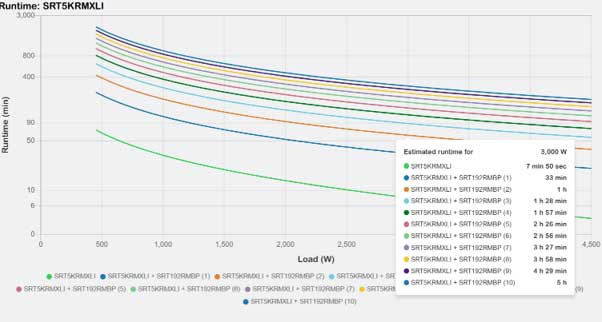
This runtime target works best when:
For most virtualisation environments, 15–30 minutes is usually enough when shutdown workflows are tested and the UPS is integrated with the virtualisation platform.
Scenario 3: Render and AI Farms
Render and AI farms are an interesting case because not all workloads are equal. A render node may perform batch processing, restart failed jobs and avoid holding critical transactional data.
Typical runtime target: 5–15 minutes
In many environments, individual render nodes do not require extended runtime. A better strategy is to protect the shared infrastructure and allow non-critical compute workloads to shut down.
A common strategy is:
Protect
Allow Shutdown
This approach can significantly reduce UPS cost while preserving runtime for the systems that matter most.
Special Considerations: Security, Access Control & PA Systems
Not all systems in a server room have the same runtime requirements. Security systems often have very different business and compliance requirements compared to traditional server and storage infrastructure.
Examples include:
While a virtualisation cluster may only require 15–30 minutes of runtime to perform a controlled shutdown, security and life-safety systems may need to remain operational for several hours during an outage.
Many organisations deploy dedicated UPS systems for security infrastructure.
Rather than connecting everything to the same UPS, critical security and life-safety systems are often protected independently to provide longer runtime and improve resilience.
Benefits of a dedicated UPS
When conducting a UPS assessment, security, access control and public address systems should always be evaluated separately from traditional IT workloads to ensure their runtime requirements are fully understood.
Should Every Device Be Connected to the UPS?
The short answer is no. Most organisations achieve better outcomes by prioritising the systems that are critical to business continuity rather than attempting to power every device in the server room.
These systems should generally be prioritised for UPS protection:
These systems should generally be prioritised for UPS protection:
Often Non-Critical
These systems can often be allowed to shut down without significantly affecting business continuity:
Selective protection can dramatically reduce UPS costs while increasing the available runtime for the systems that matter most.
Runtime vs Generator Strategy
Generators for server rooms are a topic in their own right, but when a standby generator is available, the UPS only needs to bridge the startup period rather than power the environment for an extended outage.
Most generators start within 30–120 seconds and only require a few minutes to stabilise before supplying a clean and reliable power source. For this reason, a UPS runtime of 10–15 minutes is often sufficient when generator backup is available.
The UPS becomes the bridge, not the destination.
In generator-backed environments, the role of the UPS is to maintain power while the generator starts, stabilises and automatically assumes the load.
Important Consideration
This recommendation assumes the generator is regularly maintained, fuelled and tested. If generator failover does not occur, a short UPS runtime may result in an unexpected shutdown.
Generator infrastructure is often managed by Facilities rather than the IT team, making regular testing, communication and documented failover procedures essential to a successful business continuity strategy.
Signs Your Existing UPS Runtime May Be Insufficient
Even if your UPS was correctly sized when it was installed, infrastructure changes over time can significantly reduce available runtime. If any of the following apply to your environment, it may be time to review your UPS strategy.
Don't wait until the next outage.
Many organisations discover that their runtime assumptions are based on infrastructure installed years ago. A UPS assessment can confirm whether your current runtime still aligns with your business continuity requirements.next section
Best Practice Recommendations
Regardless of the size of your server room, these best practices will help ensure your UPS solution continues to support your business continuity objectives as your infrastructure evolves.
Final Thoughts
The question isn't simply:
"How much UPS runtime can we afford?"
The better question is:
"How much runtime do our business applications actually need?"
A properly designed UPS solution should support your business continuity objectives, workload priorities and recovery procedures not simply maximise battery runtime. As server power consumption continues to increase, particularly with AI, GPU and high-density virtualisation environments, regularly reviewing your UPS capacity and runtime assumptions has become an essential part of modern infrastructure planning.
On This Page
Need help designing the right UPS solution?
Our specialists can assess your environment and recommend the right runtime for your business.
Talk to a Power Specialist
"The right UPS isn't the one with the longest runtime. It's the one that supports your business recovery strategy."
UPS runtime should be sized around the outcomes your business needs during a power event. That may mean bridging generator startup, protecting critical workloads or allowing a controlled shutdown. The right strategy balances resilience, cost and operational risk.
Key Takeaways
Frequently asked questions
Every server room is different, but these are some of the most common questions we hear when designing UPS solutions for modern IT environments.